How to play Star Wars: Jedi Arena online
Jedi Arena was made for the Atari paddle controller, a dial you turn to swing the lightsaber. The emulator above switches to paddle mode automatically for this game.
- Swing your lightsaber: left and right arrow keys
- Fire a laser bolt from the Seeker: Space bar
- Start a new game: F12 (the console’s Reset switch)
- Choose a game number (1–8): F11 (the console’s Select switch)
- Force field strength: F4 (Player 1) and F9 (Player 2) set the difficulty switches
- Switch between paddle and joystick mode: Alt + L
Gameplay
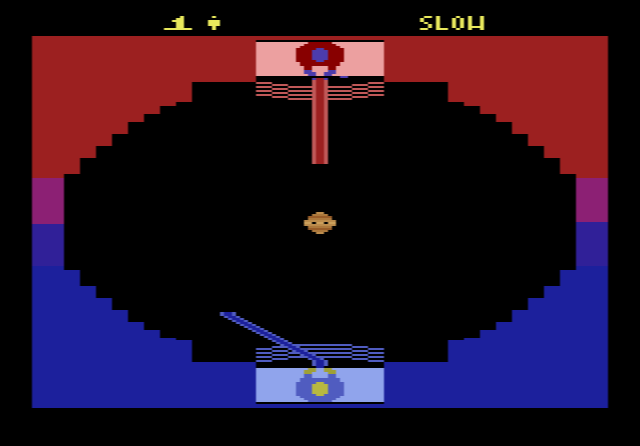
You control the blue Jedi at one end of the screen, seen from above; the red Jedi at the other end is played by the computer or a second player. Neither Jedi walks around. The action is all in the lightsaber, which points in the direction you turn the dial. The Seeker drifts between you, and pressing the button makes it shoot a bolt in the direction your lightsaber is aiming.
Each Jedi is protected by a force field made of several lines. Every bolt that hits the field knocks a piece out of it. Once there is a gap, a bolt can get through and hit the Jedi, which wins the match and scores one point. The force fields are rebuilt after each match, and the first player to win three matches becomes the Jedi Master. From time to time the Seeker goes wild and sprays coloured bolts at both players. While that happens nobody can attack, so all you can do is block.
Game numbers and switches
- Odd games (1, 3, 5, 7): one player against the computer
- Even games (2, 4, 6, 8): two players
- Games 1–2: slow Seeker; 3–4: medium; 5–6: fast
- Games 7–8: the Seeker moves at medium speed but is invisible
- Difficulty switch: position A gives that player a force field of three lines, position B four lines. In a two-player game, a weaker player can take the stronger field as a handicap.
Tips
- Keep hitting the same spot. A bolt only gets through a gap, so aim repeatedly at one section of the enemy force field instead of spreading your shots.
- Swing back to defend. After you fire, turn the saber back towards the Seeker’s line of fire so you are ready to block the reply.
- Don’t try to attack during a wild spell. Your shots do nothing then; concentrate on blocking until the Seeker calms down.
- Learn on game 1. The slow Seeker makes it easier to see how the aiming works before you try the fast or invisible versions.
History and reception
Jedi Arena came out in January 1983, after Parker Brothers’ first Star Wars cartridge, The Empire Strikes Back. Reviews at the time were mixed. Critics liked the glowing multi-coloured laser bolts and the sound effects, but players expecting an action game were let down by the Jedi who never move and the rather abstract duels. Later lists have often placed it among the weaker Star Wars games, although at least one modern critic has argued the opposite and called it possibly the best Star Wars game ever made. Played with a real paddle against a friend, it is a quick and tense duel.