How to play Tennis online
- Move your player (Player 1): arrow keys. Left and right move along the court, up and down move towards or away from the net.
- Serve (Player 1): Space bar
- Player 2 in a two-player game: T/F/G/H to move, A to serve
- Choose a game (1–4): F11 (the console’s Select switch)
- Start the match: F12 (the console’s Reset switch)
- Difficulty switches: F4 for Player 1, F9 for Player 2
The fire button is only used for serving. You never press a button to swing: your player hits the ball automatically when the racket meets it, choosing forehand or backhand on its own.
Gameplay
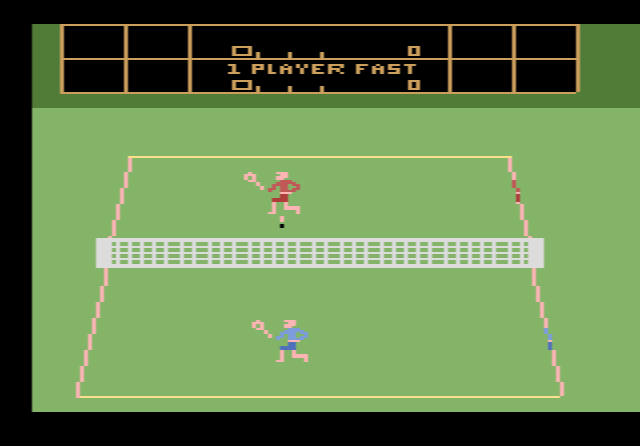
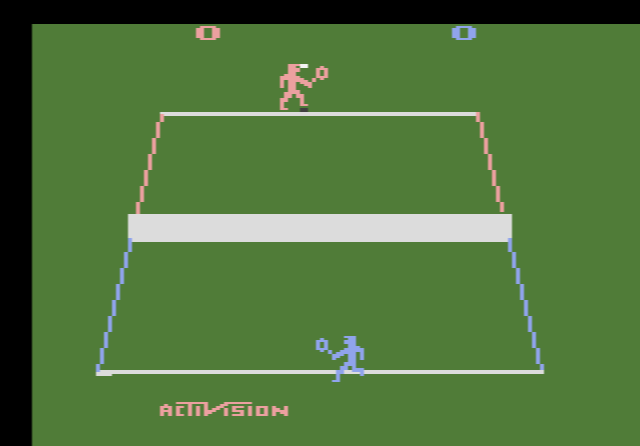
One player is orange and the other is blue. The left joystick always controls the orange player; the blue player is either the computer or a second player on the right joystick. The court is shown in depth, with one player near the top of the screen and the other near the bottom, and the ball casts a shadow so you can judge how high it is.
The game is forgiving about the basics. Your first serve is always good, and the ball never goes out or into the net. What decides the point is where the ball touches your racket. A hit in the middle of the racket sends the ball straight; a hit near the edge sends it off at an angle. Volleys at the net fly shorter than shots from the baseline, but can be angled more sharply.
Scoring follows real tennis: 15, 30, 40, deuce at 40-all, then advantage. You play one set, and to win it you need at least six games and a two-game lead.
Game variations and difficulty switches
- Game 1: you against the computer, full speed
- Game 2: you against a friend, full speed
- Game 3: you against the computer, slow motion
- Game 4: you against a friend, slow motion
The difficulty switches change the range of shots. In position B, players can hit the ball at many angles, including very sharp ones. In position A, the widest-angle shots are removed, which makes rallies longer and winners harder to find.
Tips
- Start in slow motion. Games 3 and 4 give you time to learn how the contact point on the racket changes the angle of the ball.
- Go cross-court. The computer reaches almost every straight shot. Sharp angles from the edge of your racket are the best way to get the ball past it.
- Angle your serve, then attack the net. Serve off the edge of the racket and move forward to volley the return at a sharp angle.
The story behind Tennis
Alan Miller was one of Atari’s first 2600 programmers before he left to help start Activision in 1979. He and fellow Activision designer David Crane played in amateur tennis tournaments, which gave him the idea. Miller had used an angled three-quarter view in his earlier Atari cartridge Basketball, and he brought that view to the tennis court. Building the display took him about two weeks; tuning the play took about three more months. The ball’s shadow was a small addition that made the sense of depth work.
The game fits into just 2 kilobytes. It won Best Competitive Game at the Arkie Awards, where the judges noted how far it had moved from simple Pong-style games. Atari later made its own RealSports Tennis for the 2600.