How to play My Golf online
- Start the game: F12 (the console’s Reset switch) or the Space bar
- Choose one or two players: F11 (the console’s Select switch)
- Open club selection: Space bar, then up and down arrow keys to go through the clubs, and Space to pick one
- Look over the whole hole: choose the view option in the same list, scroll with the up and down arrow keys, and press Space to leave
- Aim your shot: left and right arrow keys move the small arrow above the ball
- Swing: Space three times (see below)
- Save and load your progress: Ctrl + 0–9 saves to a slot, Alt + 0–9 loads it
Gameplay
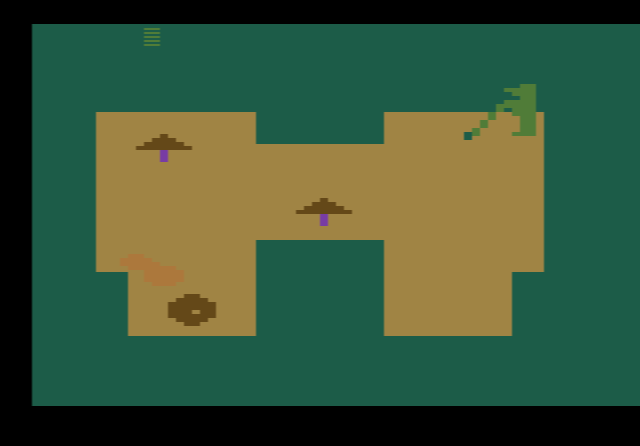
Each hole is seen from above and stretches over several screens, with trees, sand traps, ponds, rivers, rough and out-of-bounds areas between the tee and the green. The panel at the bottom shows the hole and par, yards to the hole, your club, your strokes and the wind. Between holes you see your total strokes and your handicap, which is simply how many strokes you are over or under par.
You have 16 clubs: four woods, eleven irons (1 to 9, plus a sand wedge and a pitching wedge) and a putter. The swing works with three presses of the button while a coloured bar moves above your golfer:
- First press: starts the swing.
- Second press: sets how hard you hit the ball.
- Third press: sets the direction. If the bar is between the two dots, the ball flies straight. Left of the dots it hooks (curves left), right of the dots it slices (curves right).
On the green the game switches to a separate putting screen, and you putt with the same three-press swing. After each shot lands, press the button to pick your next club. In a two-player game the players take turns.
Tips
- Use the view option on every new hole. The hole is longer than one screen, so check where the water and sand are before you tee off.
- Curve around trees on purpose. A deliberate hook or slice can bend the ball around an obstacle instead of over it.
- Club down near the green. Watch the yards-to-hole counter and switch to an iron or wedge rather than overshooting.
History
My Golf was the only original Atari 2600 game HES published. The company was better known in Australia for distributing other firms’ games. A version under the Salu label was also sold in Europe. Two versions of the program exist: the second fixed a small bug in the code of the first. Programmer David Lubar also made Fantastic Voyage, Spacemaster X-7 and River Raid II for the 2600, and later became a writer of many books for young readers and teenagers.