How to play Pressure Gauge online
- Press the gauge button: Space bar
- Start a new game: F12 (the console’s Reset switch)
- Watch the scrolling text demo: F11 (the console’s Select switch) on the title screen
Gameplay
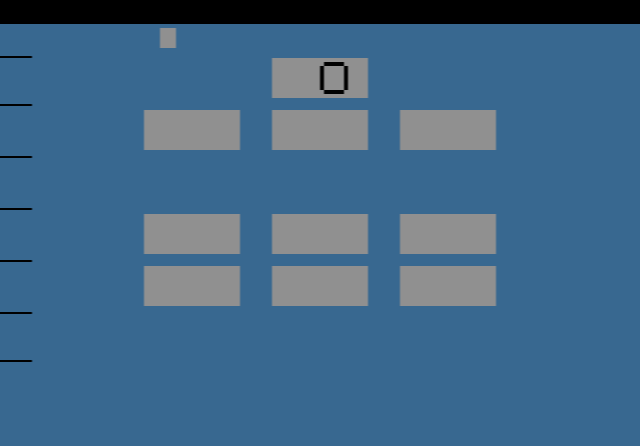
The screen shows three bars. On the far left is a small marker, the “range”. Next to it is a gauge that keeps filling up. Press the button while the filling gauge is level with the range and the second gauge goes up a little. Press at the wrong moment and the second gauge drops a little. Fill the second gauge all the way to the top to clear the level. The bar on the right is your timer: it counts down, and if it runs out before you clear the level, the game is over.
The game gets harder in a cycle of ten levels. Levels 1 to 5 go from slow to very fast. Levels 6 to 10 repeat those speeds, but now the lights flicker, which makes the gauge harder to read. After level 10 the cycle starts again from slow, with new surprises added. John K. Harvey’s own record is 54, and he invited players to beat it.
Tips
- Don’t press just to press. A miss costs you progress, so it is better to wait for the next clean pass than to guess.
- Learn the rhythm on the slow levels. The first levels are the best time to get a feel for when to press.
- Watch the range, not the gauge. On the flickering levels, keep your eyes on the fixed marker and press when the moving bar reaches it.
History
Harvey, known on the AtariAge forums as Propane13, wrote Pressure Gauge around 2000. The text demo hidden behind the Select switch was his first try at scrolling text on the 2600, and it later grew into a separate release called StickyNotes. A follow-up, Pressure Gauge 2, also exists as a beta version.